Cable, Fold back & PA
- TIA LEONI LEWIS
- Jan 25, 2016
- 10 min read
How cables work? And what are they used for?
Balanced and unbalanced cables
XLR
TRS JACK
SPEAKON
QUAD CORE
RCA
TS JACK
MINI JACK
Y-CABLE
JACK TO XLR (this could also be a balanced cable)
UNBALANCED
Traditional unbalanced cables are made of 4 parts, conductive, insulated (dialectic) , shield , outer insulating layer. Conductive parts called lines- so unbalanced cables use two lines. The core is known and the hot line , since this is the part that transmits the current. The outer shield is the earth line. The earth line shields the core by intercepting unwanted electromagnetic interference and running it to the ground so that y cannot reach the core and affect the audio signal. However this system is not perfect so an audio signal will pick up noise caused by electromagnetic interference from there power sourced when it is passed through an unbalance cable. The longer the cable the more noise will be picked up. So when working with unbalanced cables its best to keep the lengths as short as possible.
Balanced
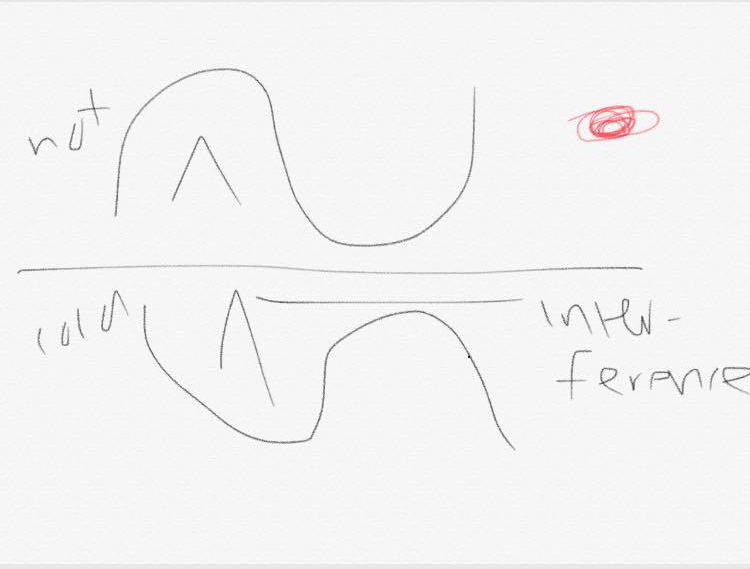
Hot and cold line. Both the hot and cold lines carry there audio signal, but the voltage on the cold like is inverted, so that when the hot line carries the positive voltage, the cold carries a negative one.
HOT LINE COLD LINE
When the cold signal is inverted this brings the signal back i to phase but puts the noise put of phase. In this way noise picked up by the signal at it passes through the leaf is cancelled out, this makes balanced cables better for long lengths to there electrical interference is high.
XLR CABLE- XLR cable is a balanced connection. You can get them in different lengths that you may use for different things. With recording in a studio you may want to use a shorter lead rather than having so much cable laying around all over the floor while recording. This will also be a trip hazard and cause problems. It is also possible for leads to heat up from how much power is going into them, so just to keep things tidy and safe you may want to use a cable that is shorter in the studios.
How they work?
The XLR cable is an electrical connector, this is more likely to be found as professional audio, video and stage lighting equipment. They are most commonly associated with balanced audio interconnection. You can get them with different pin numbers. The main one that people use is the 3 pin XLR cable but you can also get a 4, 5 and 6 pin cable XLR. The three pin XLR cable is the standard cable that is most commonly used. XLR connectors are available in male and female versions in both cable and chassis mounting designs, a total of four styles. This is slightly unusual as many other connector designs omit one of the styles (typically a chassis mounting male connector).
The number of pins varies from three to seven. XLR connectors from different manufacturers will intermate, with the exception of Switchcraft 6 pin models, which use a non-standard arrangement for the pins.
What are they used for?
XLR cables can be used for a variety of things. They can be used in a PA system, they are commonly used for microphone connectors. You can also use them when connecting a microphone into an amplifier. This just makes the connection balanced and steadier. In audio, you will typically see XLR cables connecting microphones to mixers and connecting various outputs to powered speakers.
JACK TO JACK CABLE – You can get jack to jack cables in all different sizes. You can get them at the end of headphones. That is a smaller version of a jack cable. Although the speakers are at one end and the input jack in the other it is still the same concept. The only this is that it’s smaller. You can also get the ones that connect a guitar to an amp. This one is slightly bigger. Enough that you can notice but it has the same concept.
The ¼” (Quarter Inch) Jack Connector is probably the most commonly used jack connector. The quarter inch jack is the type of connection that is used on electric guitars and guitar amps. The plug itself is always ¼” or 6.3mm jack, with a single black ‘hoop’ called an insulating ring towards its tip (this indicates that this is a ‘mono’ or single channel connection). However this cable is known to be unbalanced a cable. This means that it hasn’t got the best quality as a balanced cable. However a balanced jack has to be compatible with its equipment that it is being used for.
The ¼” Balanced Jack (Or Stereo Jack) Connector is exactly the same size as the normal unbalanced jack t jack. The difference between the two it that this connection is capable of carrying two channels of audio (e.g. a stereo signal, with a separate left and right channel).
This is done via a Tip, Ring, Sleeve (TRS) design, the plug itself now divided with two black hoops. The tip is the pointy end, the ring is the section after the first black hoop, and the sleeve is after the second.
The Stereo Minijack Connector is now, arguably, the most common audio connection of all. The stereo minijack is the plug that you’ll usually find on MP3 player headphones. This connection is smaller, with a 3.5mm (1/8″) plug. This is also a TRS arrangement, with two insulation rings. And, again, the left and right channels are carried by the tip and ring with sleeve as a common ground.
The RCA Connector- the RCA plug may be as familiar to you as mini-jack plugs, as these are used frequently in Hi-Fi and home audio equipment. The acronym RCA stands for Radio Corporation of America, and is they who were responsible for the development of this connection.
This is also sometimes called a phono connector or cinch connector. It’s a type of electrical connector commonly used to carry audio and video signals. The connectors are also sometimes casually referred to as A/V jacks. The phono means “phonograph”.
What may be the disadvantages?
One problem that you may come across with the RCA connector, is that when connecting the male end into the female end, the inner signal connection is made before the ground connection has been guaranteed. This often produces a loud buzz.
Another problem you might come across is that each signal requires its own plug. This would mean that a simple set up would be made a lot more complicated. You would need two for the input and two for the output.
What are they used for?
They are mainly used for video. They are often color-coded, yellow for composite video, red for the right audio channel, and white or black for the left channel of stereo audio. These jacks can be found on the back of almost all audio and video equipment.
They are also colour coded. To for what colour is on the cable itself then you also have the same colour on the TV or whatever you are wanting to put the cables into.
Speakon cable – this is also known to be a SpeakON cable. This is a type of cable connector. This cable is most commonly used in professional audio systems for connecting loudspeakers to amplifiers. The name speak on is a trademark.
This kind of cable is designed with a locking system that may be designed for soldered or screw-type connections. Line connectors (female) mate with (male) panel connectors and typically a cable will have identical connectors at both ends. Speakon connectors arrange their contacts in two concentric rings, with the inner contacts named +1, +2, etc. and the outer contacts connectors. They are made in two, four and eight-pole configurations. The two-pole line connector will mate with the four-pole panel connector, connecting to +1 and −1; but the reverse combination will not work. They are also able to handle a higher current than normal cables.
What are they used for?
“The speakON is a loudspeaker connector which is designed for highest mechanical and electrical loads and fulfil all safety standards. They are used to transmit high currents which occur for example at amplifier - loudspeakers lines. Due to speakON's mating mechanism arcing is prevented and electric shocks cannot happen. The speakON connectors are UL-recognized and CSA-listed.” (Anon., 2016)
Fold Back Systems
What is a fold back system?
A fold back system is also known as the monitor system. This is a monitor set up that you point at the performers while they are performing in a live performance. This is so that they can hear what they are doing rather than not being able to hear that well from the speakers facing the audience. This will also mean that they can keep in time with their own strumming while singing at the same time. This just makes sure for a better performance. The general idea is for the performers to hear the same thing as the audience.
For example, the vocalists might hear a mix with their own voice louder than everything else to help them monitor their own sound.
They lay on the floor near the performer, in the direction in line with them so they can hear the direct sound. They are usually wedge shape that will sit at the front of the stage. However other ways that the performers can hear what they are doing is by wearing a headset instead that is a wireless connection to what the onstage speaker monitor would have been connected to.
Health & Safety
To be safe with moving the “PA” system (which will include the fold back system of the on stage monitors for the performer) from location to location or even room to room, it must be light and compact as [possible. This will ensure that nobody will get injured while carrying them, and also that the equipment will less likely be dropped and damaged by the person carrying the equipment.
Some pieces of equipment should state on them if the weight of that object is suitable to be carried by one person. If it is not then by no means should you try and carry it by yourself. This would put you at risk of hurting yourself or others around you, or dropping the equipment and then breaking it. So be safe while you are setting you the PA system.
You will also need to make sure that leads are safe. By this I mean make sure that there is no risk of being electrocuted. The wires must trill be in tacked and making sure they have not split down the casing for any reason. You will also need to make sure that when you are setting up the wires that they are safely put around the edges of the placing which you are setting it up in. outside the room is a good place because it is then not a trip hazard.
Wedge monitor
Wedge monitors are very simple, but there are two main components to it: power source, and signal type. A wedge monitor is something that a performer will have in front of them while they are on stage performing. This is so they can hear what they are doing. The idea behind them is so that the performer can hear what the audience would hear.
Advantages- the costing of them are cheaper than their rivals, and in ear monitors. They are cheaper for two reasons. One being that they are just generally cheaper, and the other reason being that if you have a lot of people on stage they can actually share monitors. Also unlike sound isolation headphones, the monitors allow you to interact with the audience more.
These types of monitors however are known to be more popular, this is because they are simple and easier to use.
Disadvantages – the size is a problem. Not one that can be handled and dealt with, but they are a pain to move with being the size of a normal speaker. This will also take up room on stage and could be a possible trip hazard if you, for some reason, was to be walking backwards, you could trip over this. The size also makes it more difficult to travel with and carry.
Feedback can also be an issue. When you have more speakers on stage, you will get more stage noise. It is only natural that more stage noise will produce a higher chance of feedback.
What is feedback?
Feedback is unwanted interaction between the speakers and microphones of a PA system
Other disadvantages-
Noise pollution can also be a problem. While you are on stage, and the more speakers/monitors you have, the more the microphones will pick up. So it will just be a vicious circle. This is also a form of feedback. If this maybe the case, and those noises are being producing through the mains. I suggest using gates on the mics, to help control that noise from being heard through the house.
What is a gate?
A Gate will have similar dials to the compressor, Threshold, Output gain, and ratio. They work similarly too. The Threshold controls the amount of input required before the gate turns on. This again should be started at 0 DB and adjusted from there.
Side fill monitors
What is a side fill monitor?
These monitors are similar to the floor wedge monitors however they stand up right rather than laying on its side on the floor which is what the wedge monitor does. These monitors are speakers that are located in areas in which the floor monitors (wedge) are not covering. This provides extra sound for onstage performers. Side fill monitors are also known as drum fill. Drum fills are typically large 2 or 3 way speakers with one or more large woofers capable of extremely high volumes.
Advantages – the one advantage is that it is less costly than other methods of monitoring. In ear monitors are pricier as they are wireless and are more complex.
Disadvantage - Communication has to be very good between the mixer and musicians. This puts a heavier load on the FOH mixer.
In ear monitors
While performers are up on stage, they will sometimes have anon stage monitor called the wedge monitor. This allows them to hear what is being played exactly the same as the audience. However some people will prefer to use in ear monitors.
The in ear monitors have many advantages, and some disadvantages too.
Advantages-
If they are used correctly, they can prevent from hearing loss. Hearing loss is caused by being exposed to a level of decibel for longer than you should be. This can also cause tinnitus which is a form of hearing loss that can be irritating. This is also known as ringing in the ear that some may have to use white noise at night in order to drown out the sound so that they are able to sleep.
The in ear monitor can also allow for a more specialised monitoring mix. For example to keep in time, a drummer might have a specialised metronome in the in ear monitor so that he can ensure that he will stay at the same tempo throughout the whole of the performance.
Another good thing with having the in ear monitors, is that the risk of feedback is brought down by a vast amount. This is good because it is beneficial to our set up.
Disadvantages-
Can be more complicated for the engineer and therefore have a higher risk of mistakes during the show. This means that the performance may go wrong and the sound may not be as at its best quality that it could be.
One of the other problems is that the performers loos the ability to communicate with the audience and interact. This can be a problem because it means that it isn’t the best ability. You don’t get eh same feeling as if you are able to interact and have fun, almost being submerged with the audience.


Comments